!
Showing posts with label microsoft crm 2013. Show all posts

Microsoft Dynamics CRM 2016 Training - Technical


Microsoft Dynamics CRM Training - Technical


Dynamics CRM is a powerful and mature Customer Relationship Management package. According to Microsoft, CRM "delivers a holistic view of each customer that enables client-facing employees to make expedited and educated decisions about strategic efforts in the sales, marketing, and customer service fields."Your effectiveness in managing your customer relationships using CRM is directly related to your level of mastery of the application. New Horizons provides training to enable you to build your skill set and get the most out of this extraordinary tool.

PART I – Applications in CRM 

Introduction to Microsoft Dynamics CRM 

Sales Process 

• Leads 

• Opportunities 

• Competitors 

• Products 

• Quotes, Orders and Invoices 

• Goals 

Marketing  

• Marketing Lists 

• Campaigns 

• Sales Literature 

• Quick Campaigns 

• Services 

• Service Calendar 

• Cases 

• Knowledge Base 

• Contracts 


PART II – Administration, Settings & Configuration 

Administration 

• Creating and managing Business Units, Users and Teams 

• Privileges, Access Levels and Security Roles 

• Creating and managing Security Roles 

• Auto Numbering and System Settings 

• Installing MUI Language Packs 

Settings & Configuration 

• Business Management 

• Sites, Sales Territories, Facilities and Resource Groups 

• System Queues and Custom Queues 

• Services and Business Closures 

• Fiscal Year Settings and Quotas 

• Subjects 

• Connections 

• Data Management 

• Duplication Detection Settings, Rules and Jobs 

• Bulk Record Deletion 

• Data Maps and Imports 

• Product Catalog 

• Understanding the Product Catalog 

• Unit Groups 

• Adding Products 

• Creating Price Lists 

• Creating Discount Lists  


PART III – Basic and Advanced Customizations in MS Dynamics CRM 

Entity Customization 

• Basic Form Customizations 

• Basic UI Customization Capabilities 

• Form Customization – Working with Tabs, Sections, Fields and IFrames 

• Introduction to Application Event Programming 

• Using Form and Field Events 

MS CRM Entity Model 

• Customization Concepts – Entity Types and Attributes 

• Creating Custom Entities and Attributes 

Relationships, Views and Advanced Views 

• Types of Relationships 

• Relationship Behaviors 

• Creating Entity Relationships 

• Entity Mapping 

Views and Advanced Views 

• Public, Personal and System Views 

• View Customizations – Common Tasks 

• Advanced Views Customizations 

Form Scripting 

• Client side scripting using Java Script 

• Working with IFrames 

Working with Web Resources 

Report Wizard, Scheduling and Exporting Reports 

Working with Dash Boards 


PART IV – Extending MS Dynamics CRM 

Processes(Workflows & Dialogs) 

• Overview of Workflow 

• Creating Workflows steps through Workflow Designer 

• Overview of Dialogs 


Introduction to Solutions 

• Managed & Unmanaged Solutions 

• Importing & Exporting Solutions 

Plugins 

• Developing Plugins 

• Deploying Plugins

For detail contacts us on firozct@gmail.com / +91 9739 222 782

Microsoft Dynamics CRM 2016 Training


Microsoft Dynamics CRM 2016 Training 

Dynamics CRM is a powerful and mature Customer Relationship Management package. According to Microsoft, CRM "delivers a holistic view of each customer that enables client-facing employees to make expedited and educated decisions about strategic efforts in the sales, marketing, and customer service fields."Your effectiveness in managing your customer relationships using CRM is directly related to your level of mastery of the application. New Horizons provides training to enable you to build your skill set and get the most out of this extraordinary tool.

Microsoft Dynamics CRM 2016 Training - Functional

In this course we will cover Dynamics CRM functionality from scratch including the 3 modules namely - Sales , marketing and Service Management. Also we would cover Microsoft Social Engagement, the new Social CRM part of Dynamics CRM.This course will enable you to become an expert on Dynamics CRM functionality and will help you boost your career.

Course Content

PART I – Applications in CRM Introduction to Microsoft Dynamics CRM 

Sales Process • Leads • Opportunities • Competitors • Products • Quotes, Orders and Invoices • Goals Marketing  • Marketing Lists • Campaigns • Sales Literature • Quick Campaigns 
• Services • Service Calendar • Cases • Knowledge Base • Contracts 


PART II – Administration, Settings & Configuration Administration • Creating and managing Business Units, Users and Teams • Privileges, Access Levels and Security Roles • Creating and managing Security Roles • Auto Numbering and System Settings • Installing MUI Language Packs 

Settings & Configuration • Business Management • Sites, Sales Territories, Facilities and Resource Groups • Working with Multi Currency • System Queues and Custom Queues • Services and Business Closures • Fiscal Year Settings and Quotas • Subjects • Connections • Data Management • Duplication Detection Settings, Rules and Jobs • Bulk Record Deletion • Data Maps and Imports • Product Catalog • Understanding the Product Catalog • Unit Groups • Adding Products • Creating Price Lists • Creating Discount Lists • Using Deployment Manager • Redeploying Dynamics CRM 

PART III – Basic Customization in MS Dynamics CRM Entity Customization • Basic Form Customization • Basic UI Customization Capabilities • Form Customization – Working with Tabs, Sections, Fields and IFrames • Introduction to Application Event Programming • Using Form and Field Events 


Views and Advanced Views • Public, Personal and System Views • View Customization – Common Tasks • Advanced Views Customization 
Report Wizard, Scheduling and Exporting Reports Working with Dash Boards 


PART IV – Extending MS Dynamics CRM Processes(Workflows & Dialogs) • Overview of Workflow • Creating Workflows steps through Workflow Designer • Overview of Dialogs 

For more details and enquery. contact us on firozct@gmail.com / 9739 222 782

Understanding the Structure of CRM 2013 - Microsoft Dynamics CRM


Understanding the Structure of CRM 2013 - Microsoft Dynamics CRM


In this video, learn the overarching structure of Microsoft Dynamics CRM 2013.

This lesson is designed to help beginners understand Microsoft Dynamics CRM 2013 and Dynamics CRM Online by learning the user interface and how the application is structured. If you watched "What is Microsoft Dynamics CRM 2013?" you learned that this CRM 2013 is not only a CRM application that's designed to work from day one, but also a framework capable of being molded to your business practices. This lesson touches on some navigational features, but focuses primarily on the architecture of the application.

Source: http://www.xrm.com/

Microsoft Dynamics CRM 2013 Certification Exams


As Microsoft has rolled out its 2013 version of Microsoft Dynamics CRM 2013 the company has setup certification exams for the new version of software. There are 5 streams of certification exams exists for Dynamics CRM 2013 as Microsoft Dynamics CRM 2013 ApplicationsExtending Microsoft Dynamics CRM 2013Microsoft Dynamics CRM 2013 DeploymentMicrosoft Dynamics CRM 2013 Customization and Configuration and Functional Application in Microsoft Dynamics Marketing

Microsoft Dynamics CRM 2013 Certification Exams

Each of the links here will take you to the certification page on Microsoft learning page.

CRM Online specific certifications:

In addition the above mentioned exams Microsoft has started two new streams for exams for the online version of Microsoft Dynamics CRM.

  • MB2-721: Microsoft Dynamics Customization and Configuration in CRM Online Fall '13
  • MB2-722: Microsoft Dynamics Deployment in CRM Online Fall '13
Related articles:

MS CRM 2013 - Interview Qestions


MS CRM 2013 - Interview Qestions


I have had posted articles on the interview questions for Microsoft CRM 2011 couple of months back and found out that there is lot number of people looking for MS CRM interview questions online. Now it is the time of Microsoft Dynamics CRM 2013 so I have updated the list and publishing here for version CRM 2013.

As the first release of Dynamics CRM 2013 ( ver 6.0) comes with lot of changes in user Interface, in Dynamics CRM 2013 Service Pack1 (SP1)  version there are considerable changes in the features  as well especially in the service management module. So if an interviewer is keen to check your knowledge on MS CRM 2013 then you can expect some questions from the new service management and service scheduling features added to this version of MS CRM 2013.

Here is the list of MS CRM 2013 interview questions

1. What is the default time period of auto-save in MS CRM 2013 forms?
2. Can you disable auto-save for a particular entity form and if yes, how?
3. What is business Process flows in MS CRM 2013?
4. Have you got a chance to customize business Process flows in MS CRM 2013? If yes, what you tried to achieved using the same?
5. List out the new process types added in MS CRM 2013?
6. Has Microsoft made any chances to the table of MS CRM, and if yes what are those?
7. How to achieve duplication detection in MS CRM 2013?
8. What are the changes in service module brings in MS CRM 2013?
9. What is business rules  and how it is helpful in scripting?
10. What is business rules in MS CRM 2013 and how you can implement the same?
11. If there exists two business rules registered for a single field on form, where business rule 1 set the value of field as X and business rule 2 sets the value of field as Y, then what will be the value of the field?

Read more : Interview questions for Microsoft Dynamics CRM 2011

I will update the list with more relevant questions as possible!

Hope the questions are useful. Please feel free to let me know your opinion!!

Microsoft Dynamics CRM 2013 User Experience Overview [Video]


The new Microsoft Dynamics CRM has a cleaner, faster and more intuitive user interface, all to drive your productivity. In this video, Eric Boocock, Senior Product Marketing Manager at Microsoft Dynamics shows new elements like the touch enabled navigation model, a new version of the customer record, a new command bar and more. Eric also demos the new Microsoft Dynamics CRM, in Firefox. Learn more about Microsoft Dynamics CRM vision at http://www.microsoft.com/en-us/dynami...


Field Level Security in Microsoft Dynamic CRM 2013


Introduction to field level security

Field level security  is a security feature available in Microsoft Dynamics CRM 2013 using which administrators can configure individual fields in Dynamics CRM web application so that user will have restricted access to those fields.

In Microsoft Dynamics CRM 2013 and Online you can use field level security to configure security roles that control user and team access rights to specific fields and entities.

One important point to remember when enabling field security is that it can be implemented only for custom fields, and not for system fields.

Benefits of field security in Dynamics CRM 2013

Using field security users can be given Create, Read, Update to individual fields in Dynamics Web forms based on the security profiles.

A Security profile determines the following:
  • Permissions to the secure fields
  • Users and Teams
A Security Profile can be configured to grant the following permissions at the field level to the added users or teams:
  • Read (read-only access to the field’s data)
  • Create (users or teams in this profile can add data to this field when creating a record)
  • Update (users or teams in this profile can update the field’s data after it has been created)
A combination of these three permissions can be configured to determine the user privileges for a specific data field.


Enabling Field security for a field on an entity form

In order to restrict access to individual form fields, field security should be enabled first and which includes the following two high level steps:
1.     Mark the field as a secure field (enable it to be secure); and
2.     Configure Security Profiles

1. Mark the field as a secure field (enable it to be secure)
Figure -1: Enable field security for a field by selecting ‘enabled’ option

This can be done by enabling the field security option on the form definition window and selecting ‘Enabled’ option as shown below.
Settings-> Customizations -> Customize the system -> Entities -> Entity Name -> Field Name.


2. Create field security profiles


Once the field(s) is enabled for field security, then we can create or use existing field security profiles to configure security to users belong to that profiles. These security profiles are similar to security roles in Dynamics CRM.


Security profiles are nothing but the means to configure field security to users by adding them to these profiles.


Field level security profiles can be created in  the following Settings section: Settings -> Administration -> Fiel Level Security Profiles.


Figure -2: Existing security profiles in the system


Figure -3: Details of a security profile


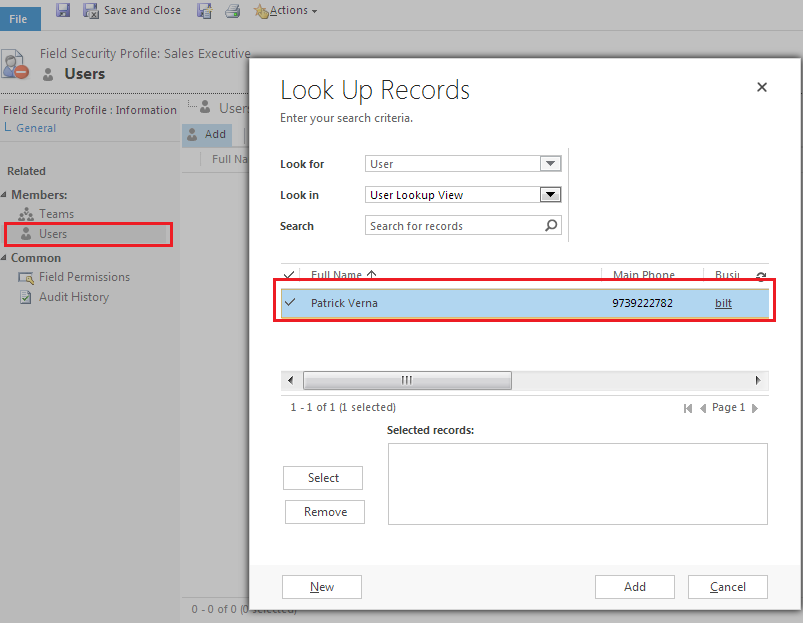
Add users or team to the profile

Once a security profile is created Dynamics CRM users can be added to the profile to whom field security need to be enabled.

Figure -4 : Adding uses to a security profile


Edit field permissions

Clicking on ‘Field Permissions’ navigation link on left side to to view the fields for which field   level security is enabled. 

Click on ‘Edit’ button on top to open the field permissions window for the particular field selected in the Field permission window.  You can select yes to to give ‘Read’, Update and Create permissions to the selected field level security profile.

Field permissions window can also be opened by double clicking on the field selected.

Figure -5: Setting Read, Update, Create permissions for  a security profile on a particular field.


Figure -6:  Edit field permissions for  a security profile on a particular field.


Microsoft Dynamics CRM 2011 Interview Questions- Security

Security is an important part of Microsoft Dyanmics CRM administrator day to day activities. Developers who customize and implement the Microsoft CRM also should have a good idea of security model. In any Microsoft CRM technical interview you can expect a couple of security questions. So I have compiled the most important security questions here.


Microsoft-Dynamics-CRM-2011-security-role-record-field-level-privilege-access-level

1. Difference between Role based and object based security.

2. What are the 3 different security levels in Microsoft CRM 2011


3. Define Role based, record based and field level security.


4. Define security roles and Field level security?

5. A user in Microsoft CRM have assigned Sales representative role and have Read access for accounts at user level. Later he assigned to a Sales manager role which has write access for accounts at organizations level. What would be the access he will have in effect?


6.  In a sales organization who implemented Microsoft CRM, sales manager wants the sales target and deadline fields disabled for sales executives from all the forms. How to achieve this?


7. Can a Microsoft CRM user apply field level security for a system entity field?


8. How to implement Field level security for a field in an entity form?


9. There exists two business units in an organization, BU1 and BU2. The admin need to give  user of BU1 access to some records that belongs to BU2. What is the best approach to configure the same?


10. Define privileges and access levels?

11. What are the five access level depths that are available for most privileges?


Also Read: Microsoft Dynamics CRM 2011 Interview Questions -1

Enjoy reading!! Feel free to add your comments below.