!
Showing posts with label microsoft crm 2011. Show all posts

Understanding the Structure of CRM 2013 - Microsoft Dynamics CRM


Understanding the Structure of CRM 2013 - Microsoft Dynamics CRM


In this video, learn the overarching structure of Microsoft Dynamics CRM 2013.

This lesson is designed to help beginners understand Microsoft Dynamics CRM 2013 and Dynamics CRM Online by learning the user interface and how the application is structured. If you watched "What is Microsoft Dynamics CRM 2013?" you learned that this CRM 2013 is not only a CRM application that's designed to work from day one, but also a framework capable of being molded to your business practices. This lesson touches on some navigational features, but focuses primarily on the architecture of the application.

Source: http://www.xrm.com/

MS CRM 2013 - Interview Qestions


I have had posted articles on the interview questions for Microsoft CRM 2011 couple of months back and found out that there is lot number of people looking for MS CRM interview questions online. Now it is the time of Microsoft Dynamics CRM 2013 so I have updated the list and publishing here for version CRM 2013.

As the first release of Dynamics CRM 2013 ( ver 6.0) comes with lot of changes in user Interface, in Dynamics CRM 2013 Service Pack1 (SP1)  version there are considerable changes in the features  as well especially in the service management module. So if an interviewer is keen to check your knowledge on MS CRM 2013 then you can expect some questions from the new service management and service scheduling features added to this version of MS CRM 2013.

Here is the list of MS CRM 2013 interview questions

1. What is the default time period of auto-save in MS CRM 2013 forms?
2. Can you disable auto-save for a particular entity form and if yes, how?
3. What is business Process flows in MS CRM 2013?
4. Have you got a chance to customize business Process flows in MS CRM 2013? If yes, what you tried to achieved using the same?
5. List out the new process types added in MS CRM 2013?
6. Has Microsoft made any chances to the table of MS CRM, and if yes what are those?
7. How to achieve duplication detection in MS CRM 2013?
8. What are the changes in service module brings in MS CRM 2013?
9. What is business rules  and how it is helpful in scripting?
10. What is business rules in MS CRM 2013 and how you can implement the same?
11. If there exists two business rules registered for a single field on form, where business rule 1 set the value of field as X and business rule 2 sets the value of field as Y, then what will be the value of the field?

Read more : Interview questions for Microsoft Dynamics CRM 2011

I will update the list with more relevant questions as possible!

Hope the questions are useful. Please feel free to let me know your opinion!!

14 Microsoft Dynamics CRM 2011 Books that Every Consultant Should Have


Anyone who is trying to learn the basics of Microsoft Dynamics CRM or upgrade their knowledge on the latest version of Dynamics CRM platform needs the best resources - books on Dynamics CRM.  A bunch of good books in your shelves will help you go long way in your Dynamics CRM career.
Some of the best books on Dynamics CRM that I found out are listed out here, which is not in any particular order. 

Microsoft Dynamics CRM 2011 Application Design

Author: Mahender Pal (Dynamics CRM MVP).

This book is a guide for developers to extend Dynamics CRM using the newest customization features - custom modules, site map customization, use of developer’s toolkit to build plugins, create web applications in Silverlight and create mobile applications with Mobile Express.

Microsoft Dynamics CRM2011 Unleashed

A guide for planning, customizing, deploying, and securing Microsoft Dynamics CRM 2011. Explain how Dynamics CRM 2011 works and how to drive maximum business value from it. It also contains discussions on data visualization, SharePoint integration, user interface changes, dashboards, workflows, WCF-based programming model, UI scripting, and security.  

Working with Microsoft Dynamics CRM2011

Authors: Mike SnyderJim Steger, and Kristie Reid.

This book provides hands-on lessons on configure, adapt, and extend Microsoft Dynamics CRM 2011. Whether you’re an IT professional, a developer, or a power user, you’ll get pragmatic, hands-on insights for customizing CRM in your organization—with or without programming. 

MicrosoftDynamics CRM 2011 Step byStep


Use the easy-to-follow lessons to master the fundamentals of Microsoft Dynamics CRM 2011. It goes in depth on working within tools such as Microsoft Outlook®; tracking customer activity and communications; managing campaigns, leads, quotes, contracts, and orders etc. 

MicrosoftDynamics CRM 2011 Administration Bible

Authors: Matt Wittemann and Geoff Ables;
An in-depth, expert guide to Microsoft Dynamics CRM 2011 from Microsoft CRM experts! This in-depth Bible is packed with expert guidance on Microsoft's Dynamics CRM 2011. Whether you're new to Dynamics CRM or upgrading from an earlier version, you'll get thoroughly up to speed on everything from the basics to new features and more.

Sams Teach Yourself MicrosoftDynamics CRM 2011 in 24 Hours

Authors: Anne Stanton.

This book is a straightforward, step-by-step approach to orchestrate successful Dynamics CRM projects, automate processes, create more efficient workflows, and optimize sales and marketing campaigns. Explains in 24 simple chapters new features of Dynamics CRM ranging from the new Ribbon interface to SharePoint integration. 

The CRM Field Guide

The CRM Field Guide is an essential guide to Microsoft Dynamics CRM that everyone should have on their bookshelf. This book offers you the best practices and strategies of the combined experience of some of the most recognizable global experts in the CRM industry. 

Microsoft Dynamics CRM 2011 New Features

Authors: Jim WangDarren Liu

This book will help you master the new features of Microsoft Dynamics 2011. Covering client-side programming to perform data validation, automation, process enhancement, Plug-Ins and Processes. Also covers extending Microsoft Dynamics CRM 2011 in the Cloud.  You can read more about the book in the review that DONNA EDWARD wrote.

Microsoft Dynamics CRM 2011 Customization & Configuration (MB2-866) Certification Guide

Authors:  Neil Benson(Dynamics CRM MVP).

This book is mainly focuses on Dynamics CRM certification paper MB2-866- Customization and Configuration Certification guide, contains a plethora of information relevant to helping you pass the exam to include a practice exam. 

Microsoft Dynamics CRM 2011: Dashboards Cookbook

Author: Mark AuCoin ( Dynamics CRM MVP).

This book provides you very specific information  you need to become the Master of CRM Dashboards. visualizing your most important data at a glance. Explains how iFrames, chart customizations, advanced WebResources etc. can improve your dashboards in Dynamics CRM with scenario.

Microsoft Dynamics CRM Online 2011 Quick Reference


Just like the title says this book is a quick reference for online version of Dynamics CRM- Dynamics CRM Online 2011. Explores end-user features in CRM Online 2011 and includes step-by-step processes, tips & tricks, and expert advice from some of the country’s top CRM consultants.

MaximizingYour Sales with Micrbysoft Dynamics CRM 2011


This book is more of focusing on the functional side of Dynamics CRM targeted for Sales Professionals and other CRM Users who want to learn how to get the most from the application when working with Accounts, Contact, Opportunities, Reports and more.

DynamicsCRM Deep Dive: Security

Author: Mitch Milam (Dynamics CRM MVP).

A book dedicated for Dynamics CRM security. As name indicates a deep dive into all aspects of security related to the Microsoft Dynamics CRM 2011 application.

Silverlight+ CRM

Author: Dave and Julie Yack (Dynamics CRM MVPs). 
A guide explains how to use Silverlight with CRM 2011 application. Describes in details how Silverlight components can be added and make them building blocks for larger Dynamics CRM solutions. A guide for for developers who want to learn more about the capabilities of Silverlight and CRM 2011.

Field Level Security in Microsoft Dynamic CRM 2013


Introduction to field level security

Field level security  is a security feature available in Microsoft Dynamics CRM 2013 using which administrators can configure individual fields in Dynamics CRM web application so that user will have restricted access to those fields.

In Microsoft Dynamics CRM 2013 and Online you can use field level security to configure security roles that control user and team access rights to specific fields and entities.

One important point to remember when enabling field security is that it can be implemented only for custom fields, and not for system fields.

Benefits of field security in Dynamics CRM 2013

Using field security users can be given Create, Read, Update to individual fields in Dynamics Web forms based on the security profiles.

A Security profile determines the following:
  • Permissions to the secure fields
  • Users and Teams
A Security Profile can be configured to grant the following permissions at the field level to the added users or teams:
  • Read (read-only access to the field’s data)
  • Create (users or teams in this profile can add data to this field when creating a record)
  • Update (users or teams in this profile can update the field’s data after it has been created)
A combination of these three permissions can be configured to determine the user privileges for a specific data field.


Enabling Field security for a field on an entity form

In order to restrict access to individual form fields, field security should be enabled first and which includes the following two high level steps:
1.     Mark the field as a secure field (enable it to be secure); and
2.     Configure Security Profiles

1. Mark the field as a secure field (enable it to be secure)
Figure -1: Enable field security for a field by selecting ‘enabled’ option

This can be done by enabling the field security option on the form definition window and selecting ‘Enabled’ option as shown below.
Settings-> Customizations -> Customize the system -> Entities -> Entity Name -> Field Name.


2. Create field security profiles


Once the field(s) is enabled for field security, then we can create or use existing field security profiles to configure security to users belong to that profiles. These security profiles are similar to security roles in Dynamics CRM.


Security profiles are nothing but the means to configure field security to users by adding them to these profiles.


Field level security profiles can be created in  the following Settings section: Settings -> Administration -> Fiel Level Security Profiles.


Figure -2: Existing security profiles in the system


Figure -3: Details of a security profile


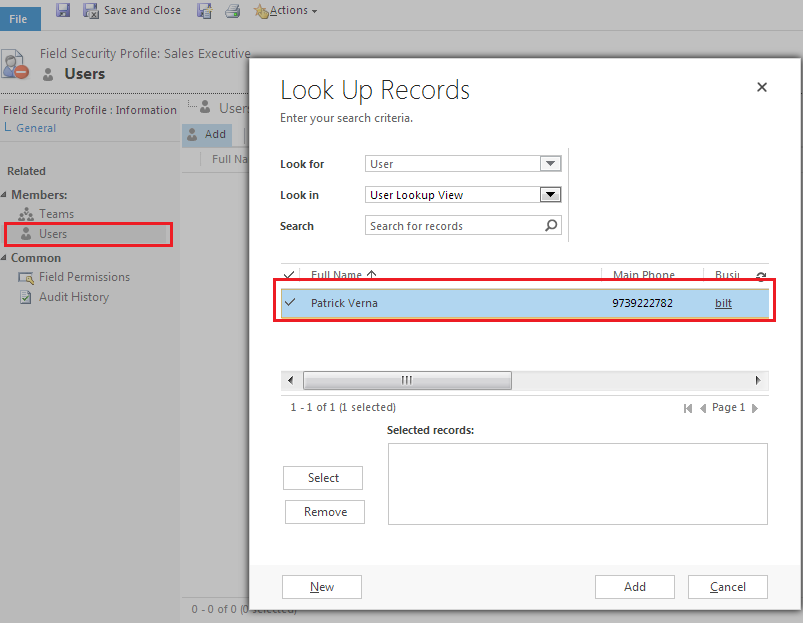
Add users or team to the profile

Once a security profile is created Dynamics CRM users can be added to the profile to whom field security need to be enabled.

Figure -4 : Adding uses to a security profile


Edit field permissions

Clicking on ‘Field Permissions’ navigation link on left side to to view the fields for which field   level security is enabled. 

Click on ‘Edit’ button on top to open the field permissions window for the particular field selected in the Field permission window.  You can select yes to to give ‘Read’, Update and Create permissions to the selected field level security profile.

Field permissions window can also be opened by double clicking on the field selected.

Figure -5: Setting Read, Update, Create permissions for  a security profile on a particular field.


Figure -6:  Edit field permissions for  a security profile on a particular field.


How to use Queues in Microsoft Dynamic CRM 2011


How to use Queues in Microsoft Dynamics CRM ?


A queue is nothing but a container for keeping  about anything that demands some action in CRM. Entities of any type can be added to the queue so that it can be assigned, categorized and processed.

Programmatically, a queue is a collection of queue items. A queue item serves as a container for an entity record, such as a task, an email, or an invoice.


An email activity in Microsoft Dynamics CRM can be converted into 3 different entities:
1. Lead
2. Opportunity
3. Case
Default Queue:
By default, every CRM user and team gets a default queue created with the user or team name respectively. You can choose to use this queue for all your work items, or you can create own queues to organize your stuff, for example on the basis of Priority.

Entities that can added to Queues?

In Microsoft CRM 2011, queues can be used for just any entity that demands some action – a task that needs to be done, a case that needs to be closed, a phone call that needs to be made

The following list contains default queue-enabled entities in Microsoft Dynamics CRM 2011:
  • Appointment
  • Campaignactivity
  • CampaignResponse
  • Email
  • Fax
  • Incident
  • Letter
  • PhoneCall
  • RecurringAppointmentMaster
  • ServiceAppointment
  • Task
Enable Queues for Entities
In CRM 2011,  you can enable other entities for queues as well. In order to enable queues for entities other than those mentioned above, you will need to enable it for individual entities.

Go to the entity’s customization screen, and check the checkbox: Queues as shown in the image below:

How-to-enable-queue-for-custom-entities-microsoft-dynamics-crm-201-2013
In entity’s customization screen, check the checkbox: Queues  to enable those item to added to queue.


Some useful Javascript code samples for Microsoft CRM 2011 [ for newbies]


Some useful Javascript code samples for Microsoft CRM 2011 [ for newbies]

I recently came across a situation where I had to customize the forms of Microsoft CRM 2011 application. Microsoft Dynamics CRM enables developers with its strong JavaScript library, using which we can  customize CRM web application as per customer requirement and business logic.


In this article I am giving a list of very basic javaScript code sampls which will help new comers to get a hang of form customization using JavaScript.

The image below shows the layout of JavaScript stack for Microsoft Dynamics CRM 2011

JavaScript stack for Microsoft Dynamics CRM 2011 form customization web application


Get the value from a CRM field

var varMyValue = Xrm.Page.getAttribute(“CRMFieldSchemaName”).getValue() ;

Set the value of a CRM field

Xrm.Page.getAttribute(“po_CRMFieldSchemaName”).setValue(‘My New Value’);

Hide/Show a tab/section

Xrm.Page.ui.tabs.get(5).SetVisible(false);
Xrm.Page.ui.tabs.get(5).SetVisible(true);

Call the onchange event of a field

Xrm.Page.getAttribute(“CRMFieldSchemaName”).fireOnChange();

Get the selected value of picklist

Xrm.Page.getAttribute(“CRMFieldSchemaName”).getSelectedOption().text;

Set the requirement level

Xrm.Page.getAttribute(“CRMFieldSchemaName”).setRequiredLevel(“none”);
Xrm.Page.getAttribute(“CRMFieldSchemaName”).setRequiredLevel(“required”);
Xrm.Page.getAttribute(“CRMFieldSchemaName”).setRequiredLevel(“recommended”);

Set the focus to a field

Xrm.Page.getControl(“CRMFieldSchemaName”).setFocus(true);

Stop an on save event

event.returnValue = false;

Return array of strings of users security role GUIDs:

Xrm.Page.context.getUserRoles()


Thanks for reading! Enjoy!

Feel free to stop and write your comments below.