Introduction to field level security
Field level security
is a security feature available in Microsoft Dynamics CRM 2013 using
which administrators can configure individual fields in Dynamics CRM web
application so that user will have restricted access to those fields.
In Microsoft
Dynamics CRM 2013 and Online you can use field level security to configure
security roles that control user and team access rights to specific fields and
entities.
One
important point to remember when enabling field security is that it can be implemented
only for custom fields, and not for system fields.
Benefits of field security in Dynamics CRM 2013
Using
field security users can be given Create, Read, Update to individual fields in
Dynamics Web forms based on the security profiles.
A Security profile
determines the following:
- Permissions to the secure
fields
- Users and Teams
A Security Profile can
be configured to grant the following permissions at the field level to the
added users or teams:
- Read (read-only access to the
field’s data)
- Create (users or teams in this
profile can add data to this field when creating a record)
- Update (users or teams in this
profile can update the field’s data after it has been created)
A combination of these
three permissions can be configured to determine the user privileges for a
specific data field.
Enabling Field security for a field on an entity form
In order to restrict
access to individual form fields, field security should be enabled first and
which includes the following two high level steps:
1. Mark the field as a secure
field (enable it to be secure); and
2. Configure Security Profiles
1. Mark the field as a secure field (enable it to be secure)

This
can be done by enabling the field security option on the form definition window
and selecting ‘Enabled’ option as shown below.
Settings-> Customizations -> Customize the system -> Entities -> Entity Name -> Field Name.
Settings-> Customizations -> Customize the system -> Entities -> Entity Name -> Field Name.
2. Create field security profiles
Once
the field(s) is enabled for field security, then we can create or use existing
field security profiles to configure security to users belong to that profiles.
These security profiles are similar to security roles in Dynamics CRM.
Security
profiles are nothing but the means to configure field security to users by
adding them to these profiles.
Field
level security profiles can be created in the following Settings section:
Settings -> Administration -> Fiel Level Security Profiles.

Figure -2: Existing security profiles in the
system

Add users or team to the profile
Once a security profile
is created Dynamics CRM users can be added to the profile to whom field
security need to be enabled.
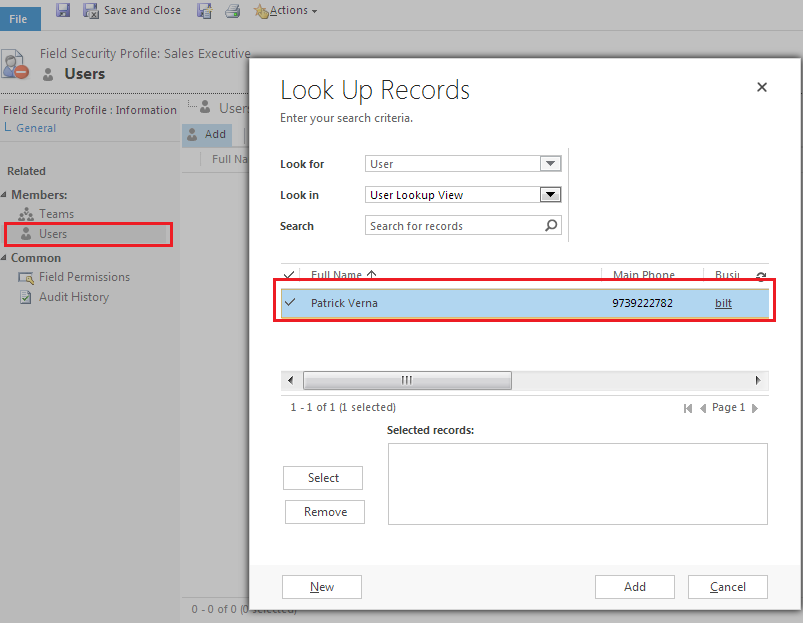
Figure -4 : Adding uses to a security profile
Edit field permissions
Clicking on ‘Field
Permissions’ navigation link on left side to to view the fields for which field
level security is enabled.
Click on ‘Edit’ button on top to open the field permissions window for the particular field selected in the Field permission window. You can select yes to to give ‘Read’, Update and Create permissions to the selected field level security profile.
Field permissions window
can also be opened by double clicking on the field selected.


Figure -6: Edit field permissions for
a security profile on a particular field.

